Processing Pipeline
Post-process Grids
After the MESA grids have finished, the important data needs to be extracted
from them. This is a multistep process that we have automated as much as possible.
Central in this process is the PSyGrid object, which is used to read and
store the MESA data. You can learn more about it below.
In general, the post-processing consists of the following steps:
step_1: Extracts the important data from the MESA output files and stores it in aPSyGridobject.step_2: Combine multiplePSyGridobjects into a single one.step_3: Add additional information to thePSyGridobject, such as supernova outcomes and remnant masses.step_4: Train classifiers and initial-final interpolators based on thePSyGriddata.
After completing these steps, the PSyGrid object contains all the
necessary information to perform population synthesis simulations.
The following diagram illustrates the processing pipeline:
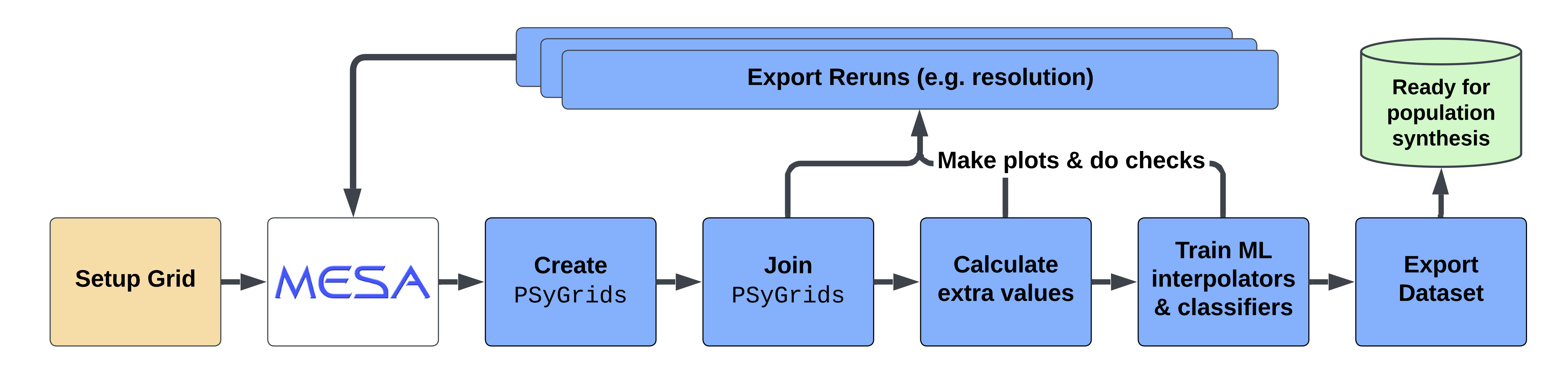
As part of the post-processing, we also generate plots and tables to summarize the results. Furthermore, the post-processing also allows for the selection of reruns, which can be used to rerun a specific subset of the initial grid with a different numerical MESA setup to reach convergence.
The post-processing steps can be run individually or as part of an
automated pipeline (the ini file configuration).
The following sections provide more details on each step and the available tools.
PSyGrid object
Our post-processing pipeline
ini file documentation
Learn how to use an ini file to set up the post-processing pipeline.